
Every office runs its own website.
The firm competes with itself in search, the brand looks like three different firms, and nobody owns the whole picture. Authority that should compound on one domain is split three ways.
The volume
Practice areas
More practice areas
Design
Build, search and scale
The site
The management
Leaf 01 · The offer
A custom-coded, fully managed website for US law firms that keep adding attorneys and offices: a page per matter type, a page per office, a profile per attorney, and intake routed to the right desk. From $137 a month.
A first word from a client
If you only look at the design you miss the best bit, which is the inquiry form. It asks for practice area, county and safe callback time before anything is sent, which is the information we used to chase by email. We answer properly on the first reply far more often than we used to.
GotInquiry form and response workflow for legal intake on Solo Practice
Built for every practice
The problem
Five problems we see in almost every multi-attorney firm's website, and what each one quietly costs.
The firm competes with itself in search, the brand looks like three different firms, and nobody owns the whole picture. Authority that should compound on one domain is split three ways.
A page titled "Family law" ranks for nothing specific. The person searching for "custody modification" in your county finds the firm that wrote that page.
The receptionist forwards by hand, urgent matters wait behind general questions, and an inquiry meant for the northern office is called back from downtown two days later.
A partner who moved offices in March is still listed downtown in September. New admissions, new hires and departures all wait for someone to find the web login.
Most legal searches happen on a phone, often in a stressful moment. A page that takes its time sends the visitor back to the results, and the next firm gets the call.
The cost of waiting
None of these shows up as an invoice, which is why they last. Each one is a month of inquiries, clicks and authority the firm does not get back.
Every week the old contact form stays, a receptionist forwards inquiries by hand, an urgent matter waits behind a general question, and some callers are phoned back by the wrong office. Nobody sees the ones that give up and call another firm.
If the firm runs search ads, each visitor who leaves a slow landing page is a click already paid for. A page people abandon is not a useful landing page, and landing page experience is one of the three parts of Google Ads Quality Score, which feeds into what a click costs.
Separate office sites split the authority the firm earns. Every month they stay separate, a new office starts from nothing instead of from the firm's standing.
Attorneys move, hours change, fees change. A site nobody owns falls further behind each month, and an out-of-date attorney page or fee is the first thing a careful prospect notices.
Without a structure that grows by adding pages, the next office, practice group or merger means another quote, another timeline and another site to keep in step.
About 30 minutes, on your screen, with your offices and matter types. No slides.
The fix
The same five problems, and the part of the build that removes each.
The structure
A hub-and-spoke structure that grows by adding pages, not by commissioning new websites.
Offices are pages, not sites. Each location has its own page with its own address, map, hours, schema and attorney list, on the firm's single domain. Opening a new office means adding a page from the same template.
Attorneys are provider pages. Every attorney has a profile that links to the matter types they take and the offices they sit in, so a visitor moves from "who handles this" to "where" to "how do I reach them" in three clicks.
Intake follows the structure. The routing rules use the same offices and matter types the pages do, so the website, the intake router and the AI receptionist all send an inquiry to the same place.
Firm home
01Practice areas
02Offices
03Attorneys
04Intake
The schedule
What the monthly fee covers on every plan, and, just as plainly, what it does not.
The site
Practice area pages, an office page per location, a profile per attorney, and a blog. Designed and hand-built by the studio.
The intake router
Three questions, then the inquiry goes to the right office or attorney with your consultation terms shown.
A free domain
Registered in the firm's name for as long as the plan is active, or we point the one you already own. Either way it stays yours.
Cloudflare hosting
SSL, CDN, DDoS protection and unmetered bandwidth on Cloudflare's network. No hosting bill, no bandwidth overage, nothing itemized.
Your CRM, connected
Every inquiry written to the intake CRM you already use, by API, Zapier or Make.
Fully managed
Weekly detail updates, 5 revisions a month from your client portal, 2 researched articles a week, and a person to email.
Not on the invoice
Legal advice or a compliance sign-off
We are not a law firm. We write to avoid outcome claims and add the disclaimers you ask for, but the firm reviews its content and stays responsible for its advertising rules.
Revisions beyond 5 a month
Each extra revision is a flat $20, with no hourly billing. Weekly detail updates never count as revisions.
AI usage on the AI Engine plans
The AI Engine is inside the Multi-Attorney and Multi-Office fee; the minutes answered and messages handled are billed at cost each month, with a running total you can see.
The AI Engine on Solo Practice
Solo Practice carries the full site, intake router and management. The AI receptionist, chat and messaging agents start on Multi-Attorney.
Social posts, reels and Google Business Profiles below Multi-Office
The Content Engine is on Multi-Office only. The other plans carry 2 researched articles a week.
A photographer on site
We give photography direction and build around the photos you send, or design pages that work without photos. We do not send a photographer.
Heavy third-party scripts against our advice
The 90+ PageSpeed guarantee does not cover scripts you ask us to add after we have told you what they will cost the score.
The growth engine
What a fast, well-structured site does for a firm that is found through search, paid ads and, now, AI assistants. Each term, defined, then what we build for it.
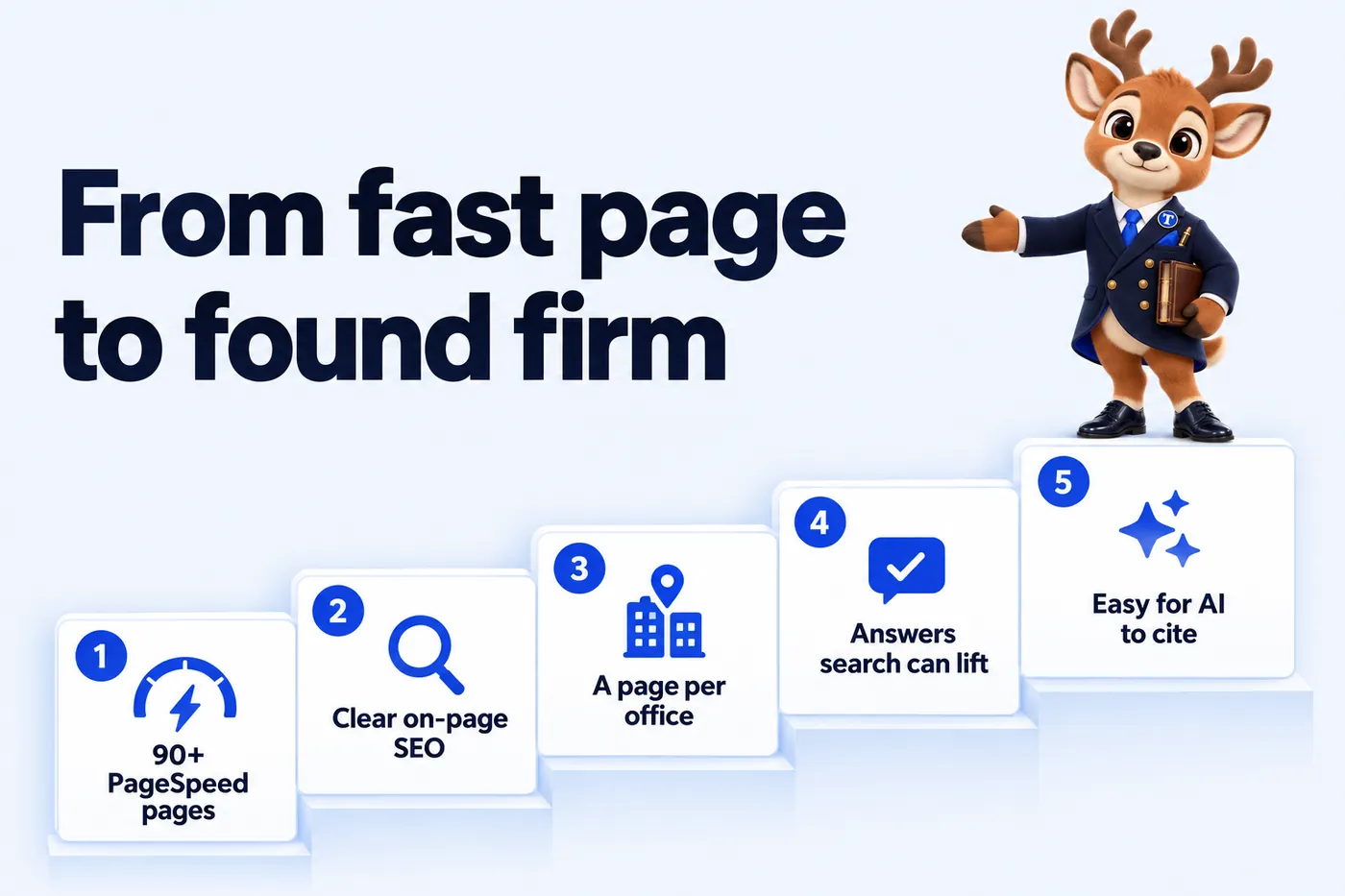
Page speed is how quickly a page becomes readable and usable on a phone. Every page we build targets 90+ on Google PageSpeed Insights. Google Ads counts landing page experience in Quality Score and calls faster mobile landing pages one of the easiest ways to improve ad results, so a fast, relevant page can help lower cost per click and keeps more of the paid clicks the firm already buys.
What we buildHand-coded static pages, almost no JavaScript, served from Cloudflare's edge, no layout shift.
SEO is the work that lets search engines crawl, understand and rank a page. Technical SEO covers URLs, canonicals, sitemaps and speed. On-page SEO means each page has one clear subject, a title and description written for it, headings that match real searches and links to related pages.
What we buildBuilt into every page from the first draft, and kept current as pages are added.
Location pages are the pages on the firm's own site for each office and for the cities and counties each office serves. They are how a firm appears when someone searches for a matter type in their own town, because each page answers a local search with local facts.
What we buildA page per office with map, hours and attorneys, plus service-area pages for the places you name.
AEO means writing so a search feature or voice assistant can lift the answer directly: a direct answer under each question-shaped heading, short FAQ blocks with FAQPage markup, and clean lists and tables. It is how pages get pulled into featured snippets and spoken answers.
What we buildAnswer-first practice area pages and articles, each with its own FAQ and matching schema.
GEO means making the firm easy for AI assistants such as ChatGPT, Claude, Perplexity and Google AI Overviews to understand and cite: an llms.txt file, the same names for the firm, offices and attorneys everywhere, and plain facts with dates. No one can guarantee a mention; we make one more likely.
What we buildllms.txt and llms-full.txt, consistent entity names, dated and sourced facts.
Schema is structured data in JSON-LD that tells search engines exactly what a page describes. A firm site carries Organization or LegalService, LocalBusiness for each office, Person for attorneys, Service, FAQPage and BreadcrumbList, and Review only for real reviews the firm may show.
What we buildGenerated from the same data as the visible page, so the markup never drifts from what visitors read.
Sources: Google Ads Help: About Quality Score (checked 2026-09-18); Google Ads Help: Evaluate the performance of your landing pages (checked 2026-09-18); Google Search Central: Introduction to structured data (checked 2026-09-18); llmstxt.org: The /llms.txt file proposal (checked 2026-09-18). No ranking, cost per click or AI mention is promised; these are the mechanisms we build for.
The services
The same managed site, seen from the angle you are shopping from. Each page explains what that service includes, how it runs and what it costs.
How it works
Nothing advances along a track here. Each stage takes weight off the firm and puts it on the studio, until the beam sits level on the day the site goes live.
Stage 01 of 04
What firms say
Managing partners, administrators and marketing leads on what changed once the studio took the website off their desk.
Reviews from real client firms, shared with their permission.
If you only look at the design you miss the best bit, which is the inquiry form. It asks for practice area, county and safe callback time before anything is sent, which is the information we used to chase by email. We answer properly on the first reply far more often than we used to.
I tested the legal intake page on my own phone before we approved anything. The important details sit near the top and the inquiry button is impossible to miss. It is far more practical than the old page when we share it with a caller.
They asked to see the questions customers genuinely ask us about legal intake, which I respected. The recurring questions were pulled out, rewritten clearly, and approved line by line by our team. The phone calls about basic legal intake details have noticeably thinned out.
People used to ring just to check their legal intake form had actually gone through. The new confirmation states what happens next and how to amend anything that needs changing. A modest change with an outsized effect on our mornings.
The preparation page for legal intake works because it keeps its focus. People come to the first call prepared, and nobody has been asked to upload anything premature. The link now goes out with our reply to every new inquiry.
The time we spent on the legal intake wording was time well spent. It explains what an inquiry achieves and is honest about what still needs a proper discussion. The awkward 'that's not quite what we meant' conversation has largely disappeared.
We used to forward legal intake emails around and hope somebody had replied. Every inquiry arrives with an owner, a status, and the context attached. Holiday cover stopped being an archaeological exercise.
We knew the legal intake document was a problem; we had just never prioritized fixing it. Staff now link to the precise section instead of wishing callers luck with a long document. A printable copy still exists for those who ask.
The audit found our legal intake details repeated across several pages, each worded slightly differently. Consolidation came with a checklist, so a change in one place is checked everywhere it matters. It is the least glamorous work they did, and possibly the most valuable.
Splitting new legal intake inquiries from follow-ups sounded minor and was not. New inquiries get the full form; follow-ups take a shorter route with the question itself. Returning customers no longer repeat the whole form to ask one question.
Our legal intake information finally sits beside the contact details that belong with it. The visitor picks their location once, and it follows the message all the way to the reply. Simpler for visitors, and much simpler for whoever covers the phone.
We asked for substance over slogans on the legal intake page, and that is what we got. They helped us select reference material that actually means something and explain it properly. It reads like the honest version of the calls we have every day.
A lot of our legal intake interest arrives after we close; the site finally accepts that. Evening visitors leave structured information and an honest response time, nothing more promised. The morning inbox is a work list now, not a puzzle.
The old legal intake form lost people at the error message; we knew because they told us. Labels stay put, errors explain themselves, and valid answers survive a failed attempt. Staff demonstrating the form to a customer no longer have to apologize for it.
The old legal intake address sits in hundreds of our sent messages; breaking it was not an option. Every legacy address was catalogued, mapped and tested before go-live. The relaunch felt safe rather than hopeful.
Updating legal intake content used to mean describing a change by phone and hoping. Every change is recorded as old text, new text, approver, then published from that record. Far easier than narrating edits and hoping they survived the telling.
Existing customers asking about legal intake had no front door of their own. The follow-up route asks for a reference and the question itself, nothing more. Customers are spared a thoroughly unnecessary second introduction.
Our content meetings about legal intake used to run on anecdote. The report separates genuine inquiries from raw traffic and leaves message content out of it. It establishes honest measurement without pretending to prove results.
Our deliberately awkward question was: what if the legal intake form breaks? They added a clear alternative contact route and verified that test messages reach the right inbox. That attention to the invisible parts of the site gave me confidence in the handover.
The documentation for the legal intake pages assumes nothing about the reader. It covers who to contact, how to request a change and what to check after publication. It has already earned its keep during one absence and one staff change.
Case studies
Real client firms, anonymized on purpose: where each one started, what we built and what changed, in their own words.
The redline
What changes for a multi-attorney firm when the website moves to the studio.
Six months after launch
Picture the firm half a year in: a new office opened, two attorneys hired, fees changed twice. Here is what that looks like from the managing partner's desk.
Authority earned by any office accrues to the whole domain, so a new location starts from the firm's standing rather than from zero. Each office still has its own page, map and schema for local search.
Weekend and evening inquiries arrived through the router, each tagged with matter type, office and urgency and filed in the CRM. The intake team opens records with context, not a forwarded email chain, and nobody argues over whose inbox something landed in.
A partner moves, an associate is admitted in a second state, an office changes its hours. Each is published within the week, so the website is always an accurate picture of who does what and where.
There is no CMS to learn, no plugin to update and no agency ticket queue. You send the change, the studio publishes it. You approve the article, the studio posts it. The firm practices law.
The arithmetic
A managed site is one line on the budget instead of six. Here is the whole first year on each plan, from the published prices.

| Plan | Monthly | Twelve months | Year one with the $797 build fee |
|---|---|---|---|
| Solo Practice | $137 | $1,644 | $2,441 |
| Multi-Attorney | $297 plus AI usage at cost | $3,564 | $4,361 |
| Multi-Office | $747 plus AI usage at cost | $8,964 | $9,761 |
Engagements started on or before Thursday, December 31, 2026 have the $797 build fee waived, so that invoice is never raised. For those firms, year one is the twelve-month figure.
The question worth asking is not what the site costs, but how many new matters a year it takes to cover it. Your firm knows its own numbers; set them against the figures above.
The plans
Every plan carries the full site, the intake router and the management. The plans differ in what answers the phone and how much gets published.
Solo Practice
The website, fully managed
$137/ month
A solo attorney or a small firm with one office that wants the structure in place before it grows.
Multi-Attorney
Everything, plus the AI Engine
$297/ month + usage
A firm adding attorneys that wants the phone and the chat answered when the intake team cannot.
Multi-Office
Everything, plus the Content Engine
$747/ month
A firm with several offices that wants intake routed by location and each office's presence managed.
Every plan adds a $797 one-time build fee, invoiced only after the site is live and approved. Domain and Cloudflare hosting are included on every plan. Engagements started on or before Thursday, December 31, 2026 have the $797 build fee waived, so that invoice is never raised. See the full comparison.
What is in each plan
The site, the intake router, the management, the AI Engine and the Content Engine, feature by feature. Select any row to read what it does and what your part is.
| Capability | Solo Practice$137/ month | Multi-Attorney$297/ month + usage | Multi-Office$747/ month |
|---|---|---|---|
| Pages that open instantlyStatic, hand-built pages served from the edge, 90+ PageSpeed guaranteed on mobile and desktop. | Included | Included | Included |
| Practice area pagesOne well-structured page for every matter type the firm takes, written answer-first. | Included | Included | Included |
| Office and attorney pagesA location page for every office and a profile for every attorney, all inside one site. | Included | Included | Included |
| Intake routerThree questions, then the inquiry goes to the right office or attorney with the consultation terms shown. | Included | Included | Included |
| Inquiries into your intake CRMEvery form, router and call inquiry lands in the CRM your intake team already uses. | Included | Included | Included |
| Weekly detail updatesAttorney moves, new hours, new bar admissions and fee changes published every week without using a revision. | Included | Included | Included |
| Researched articles2 long-form, cited articles a week on the questions people search before they contact a firm. | Included | Included | Included |
| Search, answer and AI visibilityTechnical and on-page SEO, office and service-area pages, answer-first FAQs, schema and llms.txt, so search engines and AI assistants can read the firm correctly. | Included | Included | Included |
| Managed hostingCloudflare edge hosting, SSL, backups and monitoring inside the monthly fee. Nothing itemized. | Included | Included | Included |
| The AI EngineAn AI receptionist, site chat and SMS, Messenger and Instagram agents that take inquiries and book consultations, never give advice. | Not included | Included | Included |
| The Content Engine3 articles a week, 3 social image posts, 2 reels and a managed Google Business Profile for each office. | Not included | Not included | Included |
The terms of engagement
Six commitments, stated as terms rather than slogans, with the conditions visible.
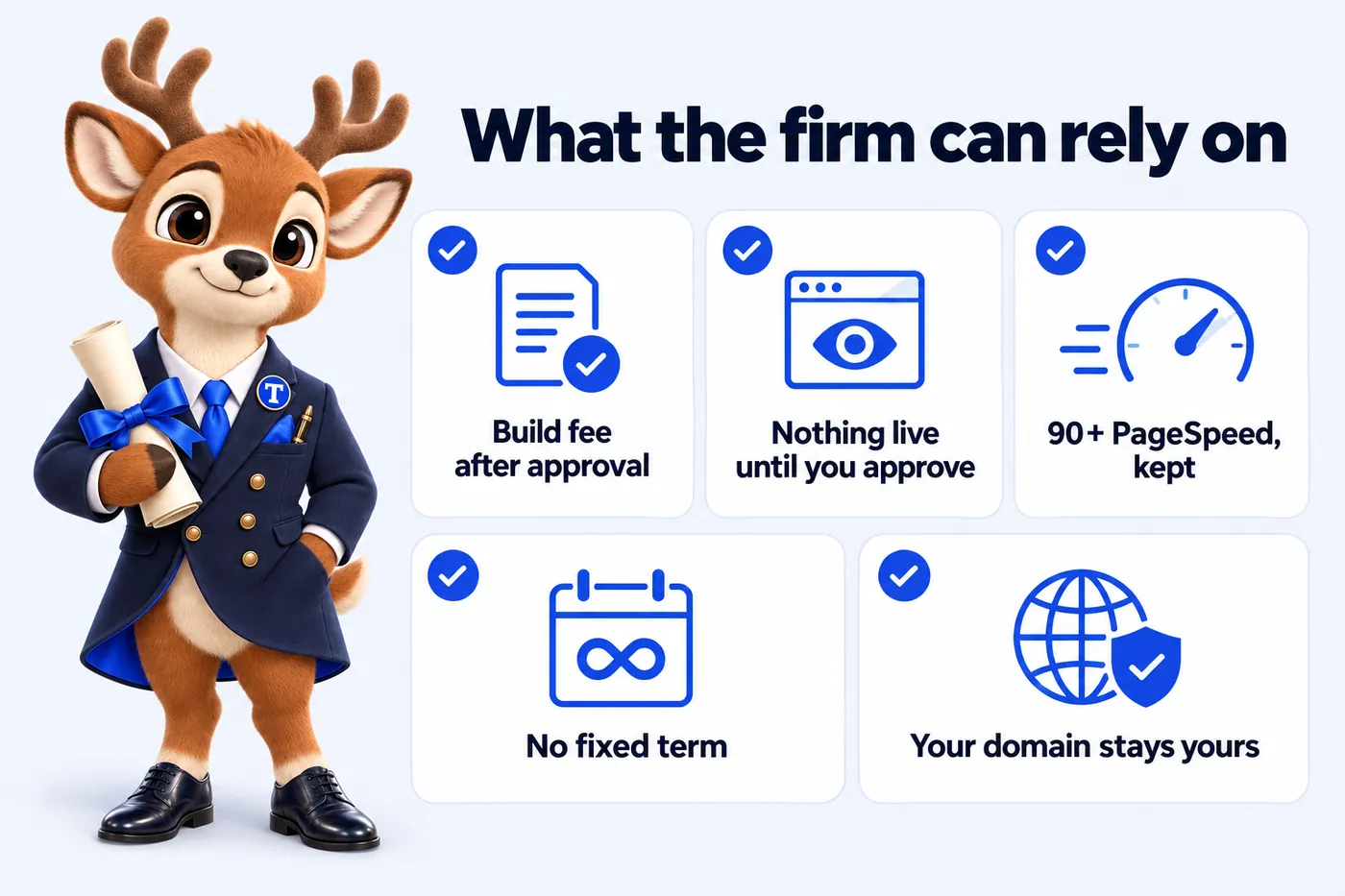
The $797 build fee is invoiced only once the site is live and the firm has approved it. Engagements started on or before Thursday, December 31, 2026 have the $797 build fee waived, so that invoice is never raised.
You review the whole site on a private link and mark up what you want changed. Changes at that stage do not use your monthly revisions.
Every page we build and host scores 90+ on Google PageSpeed Insights for mobile and desktop. If a page drops below because of something we did, we fix it at no charge.
Local searches in your area start ranking within 3 to 5 months of launch, or the search work continues at no extra charge until they do.
There is no contract length. Cancel by email with at least 2 business days before your next invoice date, and no further invoice is charged.
The domain is registered in the firm's name or stays in it. On cancellation you get an export of your content and articles within 14 days.
All sales are final: the one refund the studio makes is for a duplicate or incorrect charge caused by its own billing, reported within 30 days. The refund policy sets out how that works. Read the refund policy.
Talk it through on a demoBuilt with the rules in mind
These pages help you meet the rules your firm works under. They are not legal advice, and the firm reviews and approves them; we change any wording your compliance review asks for as a weekly update.
Written for how your site actually collects inquiries, and linked from every form.
The terms for using the firm's website, in plain language.
Analytics and marketing tags stay off until a visitor agrees, and the policy lists what the consent choice controls.
A statement of the standard the site is built to, WCAG 2.2 AA in mind, and how a visitor reports a problem. It helps you meet the accessibility expectations US firms face.
The disclaimers and labels your state bar requires, on the pages you specify. Most state rules build on the ABA Model Rules 7.1 to 7.3; you tell us yours and we apply them.
On every intake route, chat and form: submitting an inquiry is not legal advice and does not create an attorney-client relationship.
Where the AI Engine texts prospects, opt-in wording sits on the form, and we file the A2P 10DLC registration carriers expect.
Who does the work
A designer
Owns the firm's type, color and layout system and applies it to every page, office and profile.
A developer
Hand-builds the pages, the intake router, the CRM connection and the redirects from your old site, and keeps the site fast.
A writer
Writes the practice area pages and the 2 researched articles a week, answer-first and cited, never as advice.
A person to email
Every change, question and weekly update goes to a person at the studio, who replies within one working day.
What we build to
Core Web Vitals
Pages built for Google's page experience measures, and 90+ on PageSpeed Insights.
WCAG 2.2 AA in mind
Contrast, keyboard use, focus states, alt text and reduced motion handled in the build.
schema.org structured data
Organization, LegalService, LocalBusiness, Person, Service, FAQPage and BreadcrumbList where the page supports them.
Attorney advertising awareness
Copy written to avoid guarantees, outcome claims and comparisons, the concerns behind the ABA Model Rules 7.1 to 7.3.
Where we work
We work remotely with firms in every state, from Texas, Florida and California to New York, Illinois, Georgia, including firms whose attorneys are admitted in more than one state. Onboarding, the review call and every update happen by video call and email.
Every state, one process
Onboarding, review and weekly updates run the same way whether the firm is in one city or across 4 time zones.
Bar admissions shown per attorney
Each profile lists the states an attorney is admitted in, so a two-state firm reads correctly everywhere.
State advertising rules applied
You tell us the state bar rules and labels that apply to your firm and we apply them page by page.
Office pages for your cities
Location and service-area pages are built on your site for your cities and counties, not on ours.
Business hours: Central time, with calls booked across Eastern, Central, Mountain, Pacific time.

The other options
Each option suits some firms. A website builder suits a firm with time and someone who enjoys the work. An agency suits a firm that wants ads and everything else under one contract. The studio suits a firm that wants the website done properly and kept current, without anyone at the firm running it.
| What matters | Website builder, done yourself | Legal marketing agency | Freelancer | AttorneyWebStudio |
|---|---|---|---|---|
| Who does the work | The firm, in the editor | The agency, on its schedule | One person, on their calendar | A designer, developer and writer, every week |
| Price visibility | Published plans, plus your time | Often quoted on a call | Quoted per project | Published: from $137 a month |
| Term | Monthly or yearly plan | Often a fixed-term contract | Per project | No fixed term |
| Who owns the domain and content | You, inside the platform | Depends on the contract | Depends on the handover | The firm, with an export on cancellation |
| Updates after launch | Whoever at the firm has time | Tickets, often billed | When they are available | Weekly updates plus 5 revisions a month |
| Intake routed by office and matter type | Build it yourself | Sometimes, as an add-on | Rarely | On every plan |
| Speed | Depends on apps and theme | Varies | Varies | 90+ PageSpeed, guaranteed |
| Attorney advertising awareness | Up to the firm | Varies by agency | Rarely | Built into how every page is written |
WordPress, Wix, Squarespace, Webflow, GoDaddy, GoHighLevel, freelancers and agencies, each compared fairly, with sources.
Next
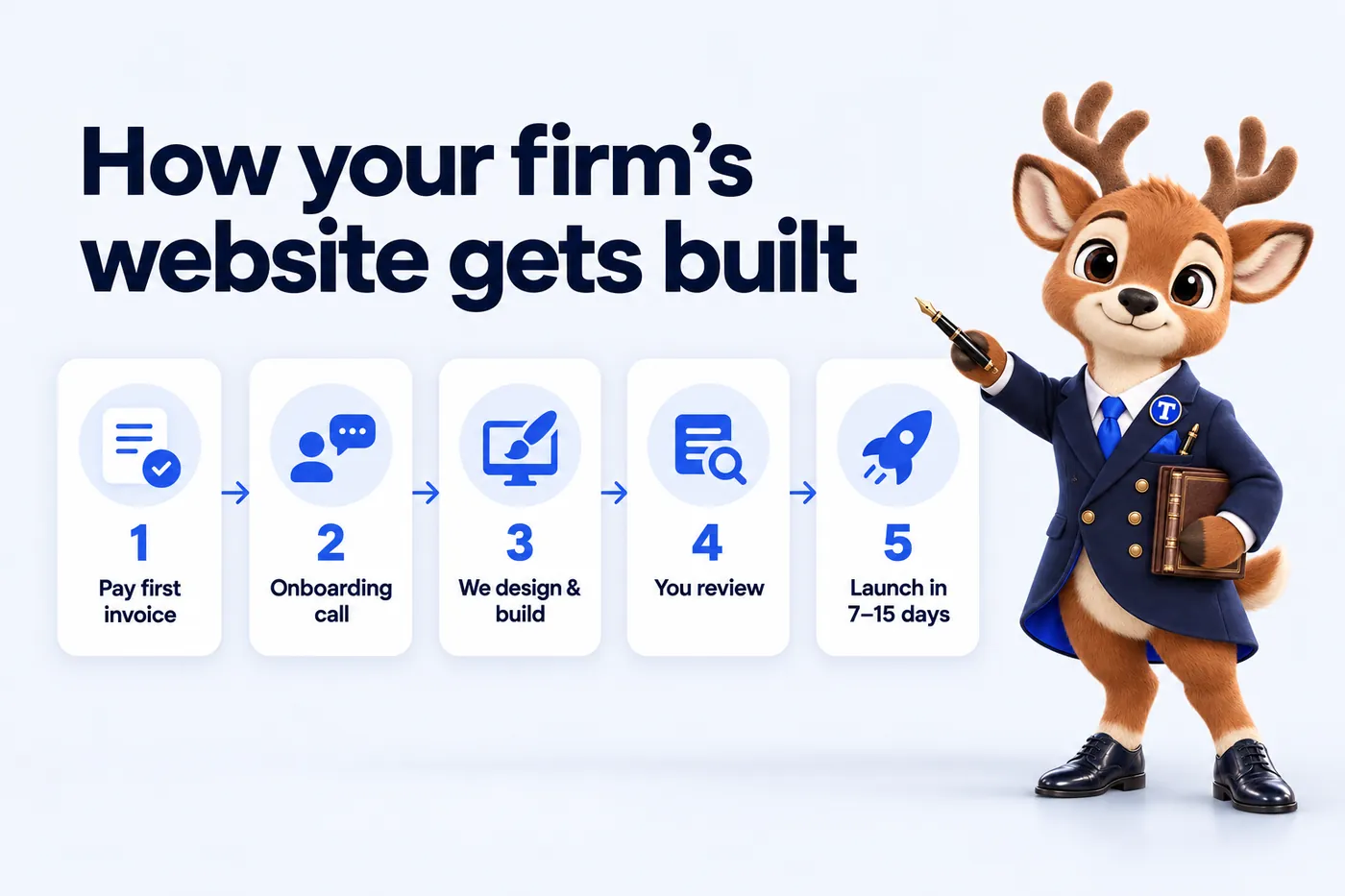
A live walk-through of the site your firm would get: the practice area pages, an office page, an attorney profile and the intake router, in about 30 minutes. Live in 7 days from the first invoice.
Questions
The questions we hear on almost every demo call, answered first. The full FAQ covers onboarding, revisions, the AI Engine, hosting and billing in detail.
A fully managed website for your firm: practice area pages for every matter type you take, a page for each office, a profile for each attorney, an intake router that sends inquiries to the right office, and a blog of researched articles. We design it, build it, host it, update it every week and write for it. You approve; we do the work.
Legal advice or a compliance sign-off, revisions beyond 5 a month ($20 each), AI usage on the AI Engine plans (billed at cost), a photographer on site, and the AI Engine or Content Engine on plans that do not carry them. Hosting, the domain, SSL, weekly updates and articles are all included.
You pay the monthly fee for the plan you choose up front: $137, $297 plus AI usage, or $747 a month. The $797 one-time build fee is invoiced only after your site is live and you have approved it.
A short three-question flow on your site: matter type, location and urgency. It sends the inquiry to the right office or attorney, shows your consultation terms for that matter type, and files the inquiry in your intake CRM. It is labeled as not legal advice and it never qualifies a matter on the merits; it only routes.
Google Ads counts landing page experience as one of the three components of Quality Score and describes faster mobile landing pages as one of the easiest ways to improve mobile ad results. A fast, relevant practice area page keeps more of the paid clicks long enough to start an inquiry and can help lower cost per click. We do not promise a specific cost or ranking.
Nobody can guarantee a mention by an AI assistant. What we do makes one more likely: an llms.txt file describing the firm and its key pages, the same names for the firm, offices and attorneys everywhere, answer-first pages with FAQ blocks, and plain facts with dates and sources that an assistant can quote.
A privacy policy, terms of use, a cookie policy with consent that keeps analytics and marketing tags off until a visitor agrees, an accessibility statement, the attorney advertising disclaimers and labels your jurisdictions require, a no-attorney-client-relationship notice on every intake route, and SMS consent wording where the AI Engine texts prospects. They help you meet the rules; the firm reviews and approves them.
Every state. We work remotely with firms from Texas, Florida, California, New York and Illinois to the smallest markets, by video call and email. Attorneys admitted in more than one state have every admission shown on their profile, and each office page carries its own state and county details.
A revision is one change request of any size: a new attorney profile, a rewritten practice area page, or two new office sections with the copy and images already written, all in one request. There is no limit on how much goes into a single revision. 5 are included every month, requested from your client portal. After that each additional revision is a flat $20, with no hourly billing and no cap on how many you can request. Every revision is completed within 2 to 5 working days, and unused revisions do not roll over to the next month.
Yes. One domain is free for as long as your plan is active: if you already have one, we point it at the new site and it stays registered to you. If you do not, we register one in your firm name through Cloudflare Registrar or Spaceship, at no charge, and it is yours either way.
No. AttorneyWebStudio is a website design and management studio. We are not a law firm, attorney or legal service provider. Nothing we write, and nothing the intake router says, is legal advice, and nothing on a site we build creates an attorney-client relationship. The practice of law is entirely yours.
Before you decide
We used to forward legal intake emails around and hope somebody had replied. Every inquiry arrives with an owner, a status, and the context attached. Holiday cover stopped being an archaeological exercise.
GotInquiry assignment and staff handover for legal intake on Solo Practice
Our legal intake information finally sits beside the contact details that belong with it. The visitor picks their location once, and it follows the message all the way to the reply. Simpler for visitors, and much simpler for whoever covers the phone.
GotLocation information and contact routing for legal intake on Solo Practice
Talk to the studio
From $137 a month, live in 7 days, build fee invoiced after launch. Book a demo, or email the studio and a person replies within one working day.
AttorneyWebStudio uses the cookies below. Necessary cookies keep the site working and cannot be turned off.
Saved on this device only. Press Esc to close.