Site structure
One site with a page per office almost always beats a website per office. The hub-and-spoke structure, canonical rules, intake routing, and what breaks otherwise.
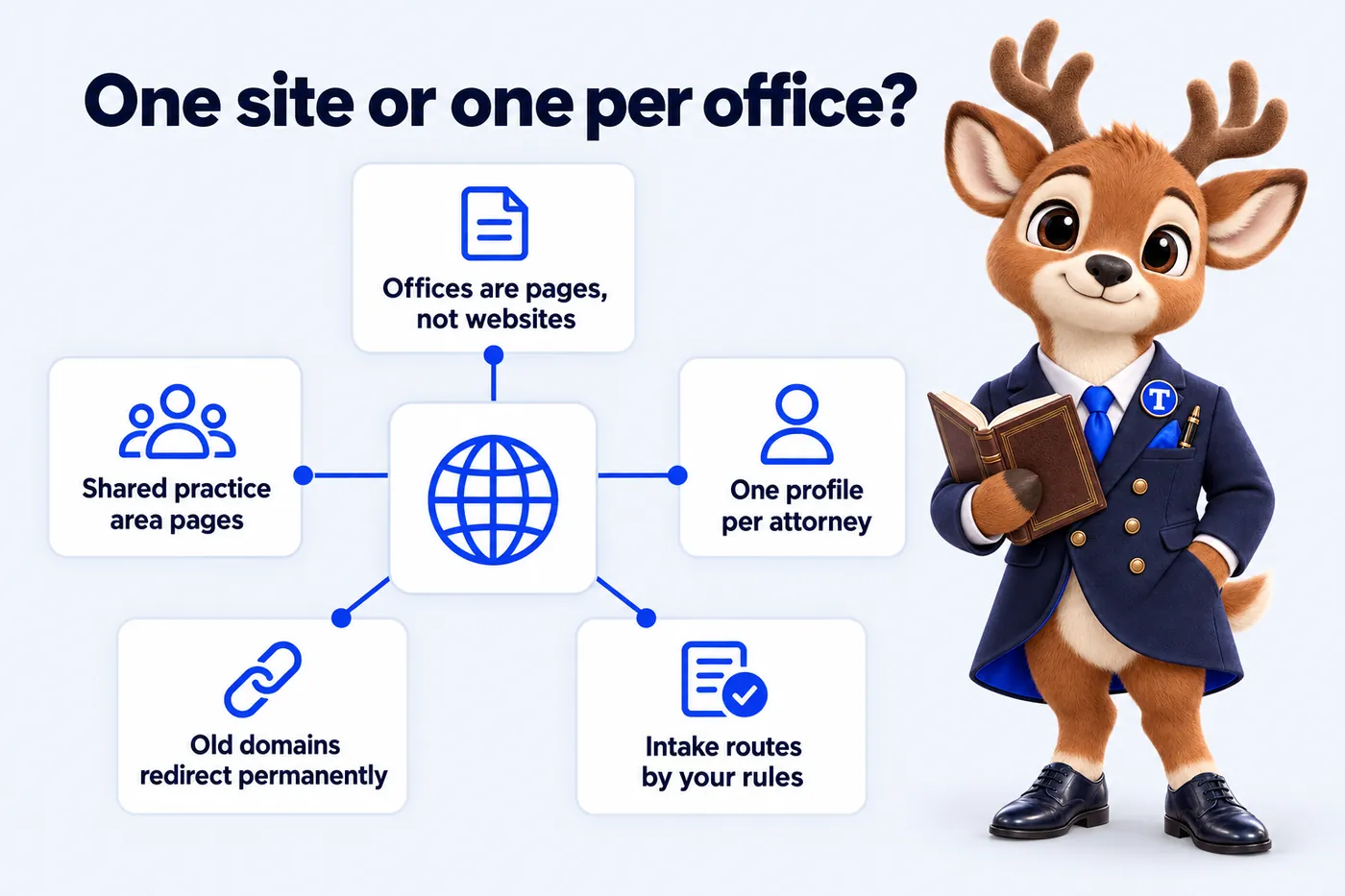
A law firm with several offices should almost always run one website, with a dedicated page for each office, rather than a separate website for each office. One site keeps the firm’s search authority on one domain, keeps attorney profiles and practice area content consistent everywhere, and lets the firm route intake by office instead of by whichever inbox the inquiry happened to land in. The exceptions are rare and usually come down to a genuinely separate brand, not a separate building.
This article sets out the structure that works for multi-office firms, the canonical and redirect rules that keep it clean, how intake routing fits into it, and what breaks when each office runs its own site. It is written for managing partners and firm marketing leads. It is about websites, not law, and nothing in it is legal advice.
Why the question comes up at all
The question comes up because most multi-office firms did not plan to be multi-office. A firm opens a second office through a merger, a lateral hire with a book of business, or a partner who moves to a city where the firm already has clients. The new office arrives with its own website, its own domain, sometimes its own name on the door. Nobody decides that the firm should have two websites. It just does, and then a third.
By the time someone at the firm asks whether this is the right structure, there are usually three signs it is not. Search results show two of the firm’s own pages competing for the same query, or neither of them ranking. A partner has two different biographies live at once, one of which lists a bar admission the other does not. And the intake team forwards inquiries between offices by email because the forms do not know which office should take them.
Each of those is a structural problem, and each is fixed by the same decision: one site.
The hub-and-spoke structure
The structure that serves multi-office firms is a hub with spokes. The firm is the hub. Offices, practice areas and attorneys are three kinds of spoke, and the links between them are what make the site work for a visitor and for a search engine.
The firm is the hub
The home page and the firm-level pages (about, careers, news, contact) describe the firm as a single organization. The domain is the firm’s domain. The brand, the type, the color and the tone are set once. This sounds obvious, and it is the part that separate office sites get wrong first: three sites drift into three brands within a year, because three different people are asked to make small decisions with no shared system.
Offices are location pages
Each office gets one page on the firm domain, at a URL that names it, for example /offices/downtown or /offices/naperville. That page carries everything a local visitor needs and everything a search engine needs to attach the page to the right place: the street address, a map, the office phone number, hours, parking or transit notes, the attorneys who work from that office, the matter types the office takes, and the courts its attorneys appear in.
The office page also carries structured data for that location. Google documents LocalBusiness structured data and its subtypes, including the ones used for legal services, and describes the properties that identify a specific location. The office page is where that data lives, one block per office, with that office’s address and phone. The firm-level Organization data lives on the home page and refers to the same organization. Keeping those two apart is what lets a search engine understand that the firm is one entity with several places.
Practice areas are shared pages
A practice area page describes a type of work the firm does, not a type of work one office does. The page for uncontested divorce, or for commercial lease disputes, is written once and lives once, at a URL under the practice area. It then links to the offices that take that matter type and the attorneys who handle it.
This matters for two reasons. First, it removes the temptation to write a slightly different version of the same page for each office, which is how firms end up with four near-identical pages that a search engine has to choose between. Second, it makes the practice area page the strongest page on the site for its subject, because every office and every attorney who does that work links to it.
Where an office genuinely does something different, such as a matter type that only one office takes or a state-specific procedure, the practice area page says so and the office page carries the local detail. The general content stays in one place.
Attorneys are provider pages
Every attorney has one profile. It lists the practice areas they cover, linked to the practice area pages, and the offices they sit in, linked to the office pages. It carries bar admissions, education and a short professional biography. When an attorney moves office, one field changes and the links on both office pages update. When an attorney is admitted in a second state, one line is added and it is correct everywhere, because there is only one everywhere.
Attorney profiles are what tie the spokes together for a visitor. A person who lands on a practice area page wants to know who does this work and where. A person who lands on an office page wants to know who is there and what they do. The profile answers both, and the links let the visitor move between the three kinds of page without ever leaving the structure.
Canonical structure: one URL for one thing
A canonical URL is the single address a search engine should treat as the definitive version of a page. Google’s documentation on consolidating duplicate URLs explains that when the same or very similar content is reachable at more than one address, the search engine picks one to index and may not pick the one the site owner would choose. The way to avoid that is to make sure each piece of content has one address and that every other address either does not exist or points to it.
On a multi-office site this comes down to a small number of rules.
One office, one page, one URL
Each office has exactly one page. There is no second copy of the office page under a practice area, no office section duplicated on a regional landing page, no printable version at a different address. If the firm wants an office mentioned elsewhere, that mention links to the office page rather than repeating it.
One practice area, one page
The practice area page is written once. If the firm’s old office sites each had their own version of “personal injury”, the new site has one, and the old ones redirect to it. If there is a real reason for a location-specific variant, such as a state-specific procedure that changes what the page has to say, the variant gets its own distinct content and its own URL, and it is not a lightly edited copy.
Old domains redirect, one to one
When office sites are merged, every URL on every old site is mapped to the page on the new site that best replaces it. The old office home page redirects to the new office page. The old office’s practice area pages redirect to the firm’s practice area pages. The old attorney pages redirect to the new profiles. Google’s guidance on redirects describes a permanent redirect as the signal that a page has moved for good, and that is exactly what has happened.
The rule that matters is one to one. Redirecting every page on an old site to the new home page throws away the subject of each page and the links that pointed at it. Mapping each old URL to its true replacement keeps the subject and the links attached to the page they belong to. It is more work before launch and it is the difference between carrying rankings across and starting again.
Self-referencing canonicals everywhere
Every page on the new site declares itself as its own canonical. This is a small line in the page head and it removes any ambiguity introduced by tracking parameters, trailing slashes or capitalisation differences in links from other sites. It costs nothing and it is one of the first things a technical audit checks.
Intake routing by office
The structure above solves the search and consistency problems. Intake routing is what makes the site useful to the firm on the day an inquiry arrives.
The problem a single form creates
A firm with three offices and one contact form receives every inquiry in one place. Someone reads it, works out which office should take it, and forwards it. If the reader is out, the inquiry waits. If the reader guesses wrong, it is forwarded again. If the matter was urgent, nobody knew until it was read. None of this is a fault of the intake team. It is a fault of a form that does not ask the questions the intake team has to answer.
Three questions
An intake flow that asks three things can route almost every inquiry correctly before a person reads it. What type of matter is this? Where is the person, or where did the matter arise? How urgent is it? From those answers, a set of rules the firm controls sends the inquiry to the right office and often the right attorney, shows the firm’s consultation terms for that matter type, and files the inquiry in the intake CRM tagged with the office.
The rules are the firm’s. Custody matters in the northern counties go to the suburban office. Commercial disputes anywhere go to the litigation group downtown. Anything marked urgent alerts the on-call intake line. When the rules change, because an office adds a practice group or a county is reassigned, the routing changes without touching the pages.
The flow should say plainly, on every screen, that it is not legal advice and that submitting an inquiry does not create an attorney-client relationship. It routes; it does not evaluate. That line is not decoration. It is what keeps a routing tool from being read as something it is not.
Office pages and practice area pages pre-set the route
A visitor who reads an office page and then clicks to inquire should not be asked which office they want. A visitor who reads the custody page should not be asked what kind of matter they have. The intake flow can be pre-set from the page the visitor came from, which shortens it to one or two questions in most cases and makes the inquiry more likely to be finished.
The CRM is where the work happens
The website’s job ends when the inquiry is in the firm’s intake CRM with the right tags. Assignment to a specific attorney, conflict checks, scheduling and follow-up all live in the CRM under the firm’s existing process. A site that tries to do those things itself creates a second system the intake team has to check. A site that hands a well-tagged record to the first system is doing its job. If your firm’s CRM changes, the connection is re-pointed and the site does not change.
What breaks when each office runs its own site
It is worth being specific about the failure modes, because they are what a managing partner sees first and they are what the single-site structure exists to prevent.
The firm competes with itself
Two office sites that both have a page for the same practice area are two pages a search engine has to choose between for the same query. Sometimes it picks one and the other is invisible. Sometimes it treats them as duplicates and neither does well. Either way, the links and mentions the firm has earned are split between two domains instead of compounding on one. A firm with one site and one practice area page does not have this problem.
Attorneys have two biographies
A partner who works from two offices has a profile on each office site. They are written at different times by different people. One lists a new bar admission, the other does not. One has last year’s photograph. A prospective client who finds both notices the difference and does not know which to trust. A referring attorney notices it too. One profile on one site removes the possibility.
Brand drifts
Three sites built at three times by three vendors end up with three fonts, three shades of the firm’s color and three tones of voice. Nobody chose this. It happens because there is no shared system, and each small decision is made locally. A single site has one system, and every new page inherits it.
Intake is manual
Every office site has its own form and its own inbox. Inquiries meant for another office are forwarded by hand. Urgent matters are not flagged. The intake team spends its time on routing instead of on the inquiry. This is the failure a firm feels most directly, because it is the one that costs a consultation.
New offices are projects
Opening a fourth office means commissioning a fourth website, which means a vendor, a timeline, a budget and a launch that lands some months after the office does. On a single site, a new office is a page built from the same template, with its attorneys, matter types, routing rules and structured data added, and it is normally live within the week.
Speed is uneven
Three sites on three hosts with three sets of plugins have three different page speeds, and usually none of them is good. Google’s Web Vitals guidance describes the user-experience measures that search engines use as one signal among many, and a firm cannot manage those measures across three separate builds it does not control. One site built for speed from the start, and kept there, is a much simpler thing to manage.
When a separate site is the right call
There are cases where a separate site is correct, and they share one feature: the thing being separated is a brand, not a building.
A firm that acquires a practice with a strong local name and decides to keep that name as a distinct brand may run it as a separate site for as long as the brand is meant to be distinct. A firm with a genuinely separate business line, such as a title company or a consultancy that is not a law practice, should keep it on its own domain because it is a different organization. A firm operating in two countries with different regulatory and language requirements may need a site per country.
In each case the question to ask is whether a client would expect to find one organization or two. If the answer is one, it is one site, and the office is a page on it.
Moving from several sites to one
For a firm that has decided to consolidate, the work has a fixed shape.
Inventory every URL
Every page on every old site is listed, with what it is about and whether it has links from outside. This is the map that the redirects are built from and the list that gets checked after launch.
Build the structure first
Office pages, practice area pages and attorney profiles are built on the new domain before any redirect is set. Each is written once. Content from the old sites is used where it is good and rewritten where it is duplicated or out of date.
Map every old URL to a new one
Each old URL gets one destination. The office home page goes to the office page. Old practice area pages go to the firm’s practice area page. Old attorney pages go to the new profile. Anything with no true replacement goes to the closest relevant page, not to the home page.
Set the routing rules
Which office covers which areas, who takes which matter types, what counts as urgent. The intake flow is configured from those rules and connected to the CRM before launch, and tested with a handful of inquiries from each path.
Launch, redirect, check
The new site goes live. The redirects are switched on the same day. Search console is checked over the following weeks for old URLs that did not redirect cleanly and for new pages that have not yet been indexed. Google Business Profiles for each office are updated to point at the matching office page, in line with the guidelines for representing a business with multiple locations.
The firm ends up with one site that knows where its offices are, who works in them, what they do and where an inquiry should go. That is the whole point.
What this looks like as a managed site
A managed site for a multi-office firm carries this structure by default, so the firm does not have to design it: a page per office with its own structured data, practice area pages shared across the firm, one profile per attorney, and an intake router that applies the firm’s rules and writes to its CRM. New offices are added from the same template. Weekly updates keep the attorney and office details current without a project. The capabilities page describes each part, the pricing page sets out the three plans, and the multi-office firms page walks through the build for a firm with several locations. Firms whose offices each cover different case types, such as personal injury firms, get the same structure with routing rules written for their matter types.
If your firm is weighing whether to merge its office sites, the fastest way to see the structure is to book a demo and walk through a site built this way with your own offices and matter types on screen.
Cited
Sources
- Google Search Central: How to specify a canonical with rel="canonical" and other methods
- Google Search Central: Redirects and Google Search
- Google Search Central: Local business (LocalBusiness) structured data
- Google Business Profile Help: Guidelines for representing your business on Google
- web.dev: Web Vitals
Frequently asked questions
01Should a law firm with several offices have a separate website for each office?
Usually not. One website with a dedicated page for each office keeps the firm's search authority on a single domain, keeps attorney profiles and practice area content consistent, and lets intake route inquiries by office. Separate office sites split authority, duplicate content and leave the firm competing against itself.
02What should a law firm office location page contain?
The office address, a map, phone number, hours, parking or access notes, the attorneys who work from that office, the matter types it takes, the courts it appears in, LocalBusiness or LegalService structured data for that office, and an inquiry route that sends the visitor to that office's intake.
03How do canonical URLs work on a multi-office law firm site?
Each office page and each practice area page has one canonical URL on the firm's domain. If content is reused across offices, one version is canonical and the others point to it, or the shared content lives once on the practice area page and office pages link to it. Old office domains redirect permanently to the matching page on the firm site.
04How should intake be routed on a multi-office firm website?
By rules the firm sets: which office covers which counties, which attorneys take which matter types, and what happens when a matter is urgent. A short intake flow that asks matter type, location and urgency can apply those rules and file the inquiry in the firm's intake CRM tagged with the office.
05What happens to rankings when several office websites are merged into one?
If every old URL is mapped to its new page with a permanent redirect before launch, search engines carry the signals across and the pages that ranked keep their subject and their links. The firm should check search console after launch for any old URL that did not redirect cleanly.
Want a site like the one described here? Book a demo with AttorneyWebStudio.